Don't just grade quizzes. Know exactly what to teach next.
QuizLM helps teachers create quizzes with AI, collect answers online or on paper, and instantly see skill gaps, mistake patterns, and student insights behind every score.
Class average. That's all you get from a typical quiz tool. The rest is guesswork.
Recommended: 10-minute visual model reteach before moving on.
Grading is easy. Knowing what to reteach is the hard part.
After every quiz, teachers still have to answer the questions that matter most.
Which skill did the class miss?
A score tells you the result. It does not show the broken concept behind it.
Who is quietly falling behind?
Some students pass overall but struggle with the same skill every time.
Why did they get it wrong?
Calculation error? Grammar confusion? Unit mix-up? The score does not say.
How do paper and online tests connect?
Most tools split them. QuizLM puts both into one picture.
Most tools stop at a score. QuizLM shows the learning behind the score.
Trusted by teachers who care about results.
Real numbers from real classrooms. Updated live.
Skill-based assessment
Every question tagged to a skill, every result mapped to a learning gap.
Paper + Digital unified
OMR scanner and digital quizzes feed one analytics pipeline.
AI that understands context
Grounded in your class data, not generic advice.
Built for real classrooms
Secure, reliable, and ready for everyday teaching.
One loop from quiz to better teaching.
Turn every quiz into a clear roadmap for your next lesson.
Create
Generate questions from slides, PDFs, documents, or a topic description.
AI PoweredAssess
Students join by QR or link. Digital quizzes, practice, surveys, or paper.
No accountsAnalyze
Skill gaps, mistake patterns, mastery trends, class and student insights.
Adjust
Know what to reteach, who needs support, and what to try next.
Teach smarterMs. Lan has a math quiz tomorrow.
Follow her journey from quiz creation to teaching insight.
Create
She uploads last week's lesson slides. QuizLM generates a 12-question check with difficulty levels and skill tags.
Assess
Half the class takes it on phones. The rest uses printed OMR sheets she scans with her browser.
Analyze
QuizLM shows that most wrong answers came from equivalent fractions, not basic calculation.
Adjust
The AI assistant suggests a 15-minute reteach plan and identifies students for small-group support.
Three ways QuizLM changes your classroom.
Everything you need to assess, understand, and respond to student learning.
Create Assessments Faster
Upload slides, PDFs, documents, or type a topic. QuizLM helps generate, improve, tag, and reuse questions.
- ✓AI question generation
- ✓Adjustable difficulty
- ✓10 question types
- ✓Question bank & reuse
- ✓Rubrics & AI editing
- ✓Excel import
Collect Answers Anywhere
Digital, paper, practice, or survey - one result pipeline. No student accounts required.
- ✓QR / link entry
- ✓No student accounts
- ✓EXAM / PRACTICE / SURVEY
- ✓Browser-based OMR scanner
- ✓Paper booklet generation
- ✓Voice responses
See What To Teach Next
Turn every answer into a teaching decision. AI-powered insights for every assessment.
- ✓Skill gap matrix
- ✓Mistake pattern flags
- ✓Tag mastery trends
- ✓Student & class insights
- ✓AI assistant
- ✓Shareable reports
Built for teachers. Simple for students.
Your classroom command center.
Manage the full assessment workflow from one place: classes, gradebook, attendance, notes, rubrics, grading, and question sharing.
Students start in seconds.
Students join from a QR code or link, enter their name and student ID, and begin. No email. No account. No setup.
Ask your class data a question.
The AI assistant is grounded in your classroom results, not generic advice.
Paper quizzes. Digital insights.
Print, scan, and get the same analytics as digital - no extra hardware needed.
Generate
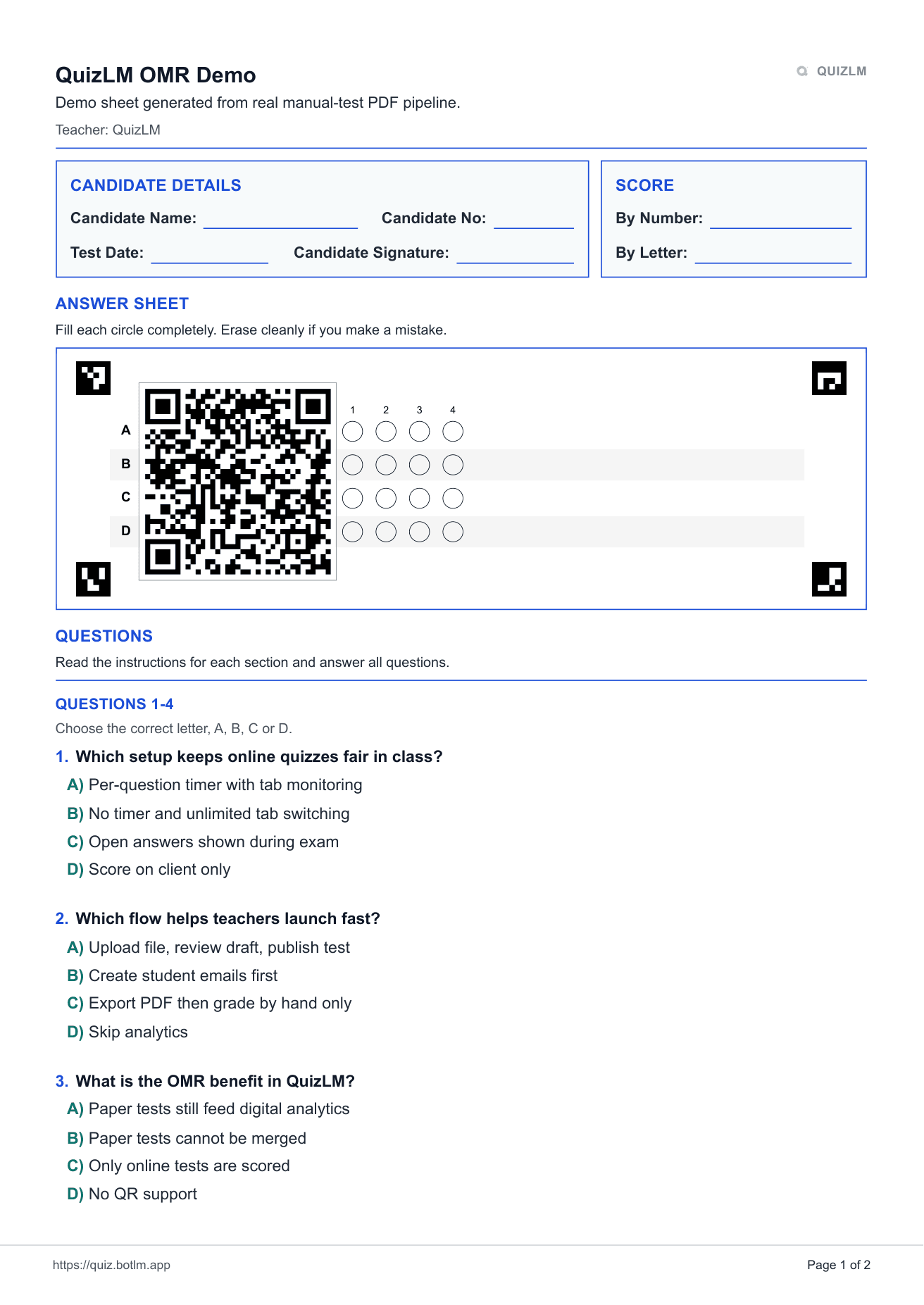
Create a printable OMR sheet from any quiz in one click.
Print & Distribute
Students fill in bubbles on paper. No devices needed.
Scan in Browser
Point your camera or upload a photo. The browser-based scanner reads it.
Instant Results
Paper results merge with digital ones. Same analytics, same insights.
Not just a quiz maker. A feedback loop for teaching.
See how QuizLM compares to typical quiz tools.
| What Teachers Need | Typical Quiz Tools | QuizLM |
|---|---|---|
| Know what students scored | ✓ Yes | ✓ Yes |
| Know which skill broke down | Limited | ✓ Yes |
| Understand why students missed it | ✗ Rare | ✓ Yes |
| Combine paper and digital results | ✗ Usually no | ✓ Yes |
| Get AI teaching recommendations | Generic | ✓ Data-grounded |
| Let students join without accounts | Sometimes | ✓ Always |
| Track mastery over time | Limited | ✓ Yes |
| Full classroom assessment workflow | ✗ Separate tools | ✓ Built in |
Built for real classrooms.
Secure, reliable, and ready for everyday teaching.
Fair Scoring
Scoring happens server-side, with validation and protected sessions built in. Correct answers are never exposed to the client.
Exam Integrity
Tab detection, one-time tokens, suspicious activity logging, and anti-cheat controls for high-stakes exams.
Works Everywhere
Mobile-first, installable as PWA, offline-ready, accessible, multilingual (English + Vietnamese), and responsive.
Start free. Upgrade when you need more AI.
Every plan includes the full classroom toolkit. Plans only differ by AI quota and queue priority.
Perfect for teachers ready to explore AI.
- ✓100 AI questions / day
- ✓Low queue priority
- ✓Unlimited students & tests
- ✓Full analytics + OMR + AI assistant
Best for active teachers using AI regularly.
- ✓1,000 AI questions / day
- ✓Higher queue priority
- ✓All features included
- ✓Priority support
Best for power users and departments.
- ✓Unlimited AI questions
- ✓Highest queue priority
- ✓All features included
- ✓Department management
- ✓Dedicated support
All Plans Include
Unlimited tests & students · 10 question types · Full analytics · Class management · Attendance · Question sharing · Rubrics · Grading queue · OMR scanner · AI assistant · Student groups · 5 visual themes
Frequently asked questions.
Everything you need to know before getting started.
Ready to see the learning behind the score?
Create it with AI, collect answers online or on paper, and see the learning gaps behind every score.
No credit card. No student accounts. Live in minutes.